 Snap Eighteen
Night Mode on Phones: What It Does and When to Turn It Off
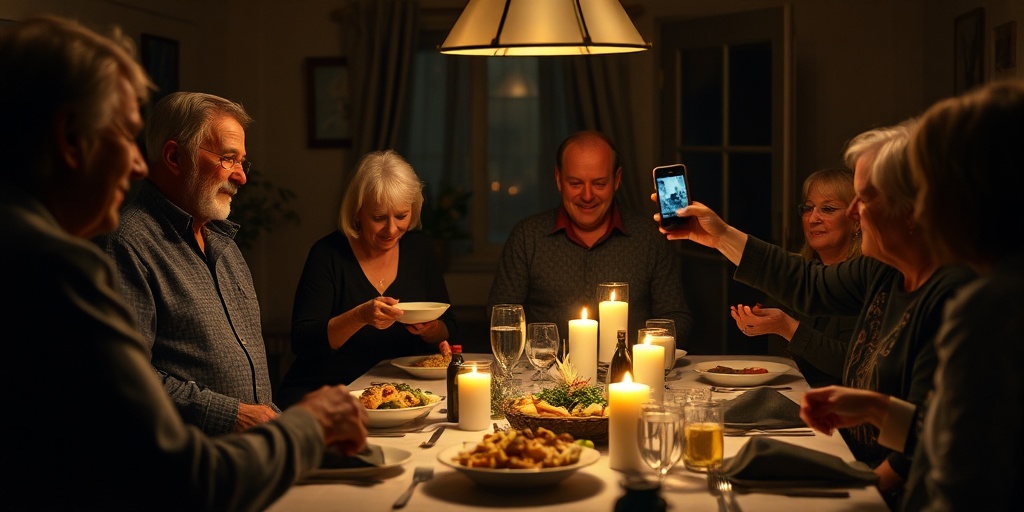
Learn how phone night mode captures images, why it ruins candid event shots, and when switching it off gives you cleaner, sharper photographs.
What the camera is actually doing in the dark
A phone camera sensor is roughly the size of a fingernail. Because it has very little surface area to collect light, taking a photo in a dim room presents a physical problem. A traditional camera solves this by opening a wider mechanical aperture or leaving the shutter open longer. On a phone, the aperture is fixed, and leaving a single shutter open for half a second while handheld causes severe blur.
Night mode does not take one long-exposure photograph. Instead, the moment you tap the shutter, the phone takes a rapid burst of bracketed photos over one to four seconds. Some frames are short exposures to keep highlights from blowing out. Others are longer exposures to gather light from the shadows. The phone then runs an alignment algorithm using gyro data to cancel out the tremor of your hands, averages the frames to strip out digital noise, and maps the tones into one final image.
The result is a mathematical composite, not a single frozen slice of time. That distinction explains both why night mode can see in pitch darkness and why it fails in predictable situations.
Why people blur while backgrounds stay sharp
The alignment software in your phone is exceptionally good at locking onto stationary objects. Walls, floorboards, tables, and framed artwork do not move between frame one and frame twelve. The algorithm aligns those edges easily, creating a crisp background.
Human beings are never completely still. When someone breathes, talks, turns their head, or laughs during a two-second night mode capture, they occupy different pixels in every single frame of the burst. The software tries to resolve these conflicts. When it fails, it produces ghosting, double edges, smeared facial features, or skin that looks painted with petroleum jelly.
If your subject is alive, night mode works against you. The longer the camera counts down, the more motion it records. A sharp photo with visible grain is almost always better than a bright photo where everyone looks like an oil painting.
The flattening of night into daytime
Night mode algorithms have a built-in bias: they believe darkness is an error to be corrected. The software calculates exposure to pull as much detail out of the shadows as possible, lifting dark corners to an artificial middle gray.
This ruins the atmosphere of intimate venues. A dim cocktail lounge, a candlelit dinner, or a back patio lit by string lights is defined by high contrast. Deep blacks give candle flames, neon signs, and accent lights their impact. When computational photography turns shadow into textured gray, the photo loses its mood and feels flat and washed out.
Real darkness is not a flaw in your photo. It is the context that tells the viewer what being in that room actually felt like.
When to refuse night mode
You do not need to let the camera decide when to engage its multi-frame burst. In general, switch off night mode whenever you encounter these conditions:
- Any scene with human motion, including dancing, walking, talking, or raising a glass.
- Atmospheric lighting where darkness is intentional, such as birthday candles, stage lighting, or campfires.
- Fast-moving candid moments where waiting two seconds for a shutter sequence will cause you to miss the reaction entirely.
- Scenes with high contrast where you deliberately want silhouetted figures against a brighter background.
How to shoot in low light with night mode off
When you switch off night mode, the phone switches back to a single exposure. Because it cannot gather as much light, you need to adjust how you handle the shot.
First, manually pull down the exposure slider. Tap on the brightest part of your subject, like their cheek under a lamp, and drag the sun icon downward. This tells the phone to stop trying to brighten the background shadows. In response, the camera uses a faster shutter speed, which reduces subject motion blur and keeps highlights crisp.
Second, anchor your hardware. Tuck your elbows against your ribs, hold the phone with both hands, and press the shutter button with a gentle squeeze rather than a hard poke. If there is a table, bar counter, or wall nearby, rest your forearms against it to eliminate camera shake.
Third, look for directional light. Instead of shooting someone who has their back to a lamp, wait until they turn toward it. A face lit by a dim 40-watt bulb from the side will render sharply at 1/30th of a second, whereas a face standing in uniform shadow will fail.
Disabling night mode permanently
Most phones turn night mode back on automatically whenever ambient light drops below a certain threshold. You tap the moon icon to turn it off, but the next time you open the camera, the yellow icon is back.
You can prevent this in your device settings. Look for camera preservation options in your operating system settings. Enable the toggle to preserve night mode settings. Once enabled, when you tap the night mode icon and set it to off, the camera keeps it off until you decide to enable it again.
Leaving it off by default lets you capture candid moments instantly. If you find a dark, empty landscape or an unmoving architectural shot that genuinely benefits from computational stacking, you can turn it back on with a single tap.
Gathering real event moments
The flaws of automatic processing become obvious at weddings and parties. When twenty people take photos of the same dance floor, the shots where night mode fired are uniformly smeared. The natural shots, taken by people who held still and accepted the ambient shadows, capture the actual energy of the room.
When guests drop their photos into a shared album like Snap Eighteen, the contrast is stark. You do not want thirty bright, smeared photos of a toast where nobody has recognizable eyes. You want the sharp, atmospheric frames that reflect the dim lights and the real expressions of the people there.
Questions
Why does my phone insist on turning night mode back on?
Phone makers program the camera to maximize brightness by default because bright photos test well in lab settings. To stop this, look for camera preservation options in your phone settings and turn on the setting to remember your night mode choice.
Is using the built-in flash better than night mode?
The tiny LED flash on a phone produces harsh, flat light and bleaches out skin tones while turning the background black. For candid social settings, lowering the exposure slider in ambient light usually looks far better than firing the direct flash.
What shutter speed does my phone use when night mode is off?
In dim light without night mode, a phone camera typically drops its shutter speed to around 1/15th to 1/30th of a second. This is fast enough to freeze moderate conversation if you brace your hands, whereas night mode extends capture time across multiple seconds.
When is night mode actually worth using?
Night mode excels at static scenes where nothing moves, such as city skylines, architecture, illuminated buildings, or still landscapes after dusk. In those scenarios, the multi-frame alignment cleanly eliminates sensor noise without causing ghosting.
Snap Eighteen is a shared camera for your event. Guests scan a code, everyone’s photos land in one album, and the album closes when the event ends.
See how it works