 Snap Eighteen
How to Photograph Candles and String Lights Clearly
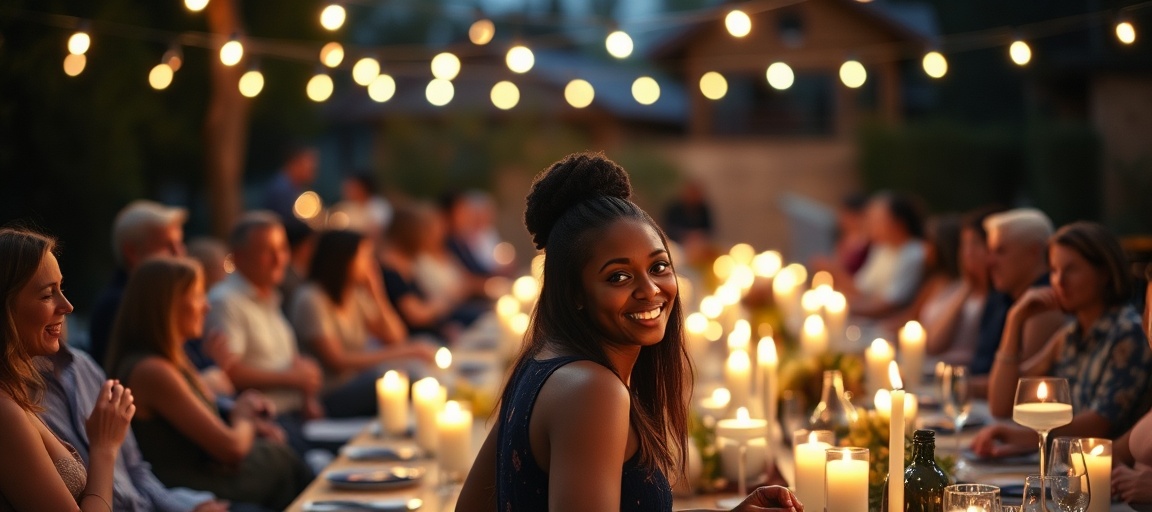
Learn how to adjust your phone camera settings to properly expose photos when candles or string lights are visible in the frame.
The Challenge of Bright Lights in Dark Scenes
Taking photos at night, especially with decorative lights, can be tricky. Your phone camera tries to capture the whole scene. This often means bright parts, like candles or string lights, become too bright. They lose detail and look like glowing blobs.
At the same time, the darker parts of your photo might disappear into shadow. This is because your phone tries to find a balance. When a very bright light source is in the picture, that balance can be hard to find.
Your Phone's Auto-Exposure System
Your phone camera has an auto-exposure system. It measures the light across the entire scene. Then it sets the brightness for the whole photo. It aims for an average brightness level.
When a bright light source, like a candle flame, is in the frame, the system sees a lot of light. It tries to prevent that light from being completely white. This can make the rest of the scene too dark. Or, it might prioritize the darker areas, making the lights too bright.
Tap to Focus, Tap to Expose
The first step is to tell your phone where to focus and what light level to prioritize. Open your camera app. Point it at your scene.
Do not tap on the bright light itself. Instead, tap on a darker area near the light source. For example, tap on a person's face lit by a candle. Or tap on the table surface under string lights. Your camera will now adjust its focus and exposure to that specific spot.
Adjusting Brightness with the Exposure Slider
After you tap to focus, a small sun icon or a brightness slider might appear on your screen. This is your exposure compensation control. It lets you fine-tune the brightness.
Drag this slider down. Move it until the bright lights look clearer. You will see more detail in the candle flame or individual string light bulbs. The overall photo will get darker. This is a trade-off. You are choosing to preserve detail in the bright lights.
Using Night Mode for Darker Backgrounds
If your phone has a Night Mode, use it for very dim scenes. Night Mode takes multiple photos quickly. It then combines them into one brighter image. This can help reveal details in the darker parts of your photo.
Turn Night Mode on. Tap to focus and adjust the exposure slider as described before. Hold your phone very still. Do not move it until the Night Mode shot is complete. This usually takes 1 to 3 seconds. Night Mode might still make your lights too bright if not combined with exposure compensation.
Why Flash Rarely Helps
Resist the urge to use your phone's built-in flash. The flash is a very harsh, direct light source. It often flattens the scene. It removes the natural shadows and highlights that give low-light photos their charm.
Flash can also create strong reflections off shiny surfaces. It can make people look washed out. It rarely adds to the atmosphere of a candlelit or string-lit event. It usually works against the soft glow you want to capture.
Hold Your Phone Steady
In low light, your phone camera often uses a slower shutter speed. This means the camera sensor is open longer. It collects more light. But any movement during this time will make your photo blurry.
Hold your phone with both hands. Brace your elbows against your body. If possible, lean against a wall or table. Even a slight wobble can ruin a low-light photo. Using a small tripod or stable surface helps even more.
Framing for Best Results
Think about how you frame your shot. Sometimes, having the light source in the center makes it hard to expose correctly. Try placing candles or string lights to the side of your frame.
You can also use lights to create bokeh. Bokeh is the blurry background effect. Place your subject closer to the camera. Let the lights be further away and out of focus. This creates soft, glowing circles in the background.
Questions
Why do my low-light photos look blurry?
In low light, your phone camera uses a slower shutter speed to gather enough light. Any movement of your phone or the subject during this longer exposure time will result in blur. Hold your phone very still, and ask your subjects to do the same if possible.
My lights look like bright blobs. How do I fix this?
This happens when the lights are overexposed. To fix it, tap on a darker area near the lights on your screen to set the focus and exposure. Then, drag the exposure compensation slider (often a sun icon) downwards to reduce the overall brightness until the lights show more detail.
Should I use my phone's flash for candlelit photos?
Generally, no. Your phone's flash provides harsh, direct light that can ruin the natural ambiance of candles or string lights. It often creates unflattering shadows and can make subjects look washed out.
What if my phone doesn't have a specific "Night Mode"?
You can still get good results. Focus on tapping to expose on a darker area and using the exposure slider to fine-tune brightness. The most important thing is to hold your phone very still to prevent blur from slower shutter speeds.
Can I make the background brighter without overexposing the lights?
This is a common challenge for phone cameras. You are usually balancing between preserving detail in bright lights and making the background visible. Try to find a composition where some ambient light hits the background, or use Night Mode if available, combined with careful exposure adjustment.
Snap Eighteen is a shared camera for your event. Guests scan a code, everyone’s photos land in one album, and the album closes when the event ends.
See how it works